In previous posts, we explored using the Send HTTP Request to SharePoint action in Power Automate for tasks like retrieving items with an OData filter query and updating a text column. Now, we'll discuss how to update choice columns in SharePoint Lists using this action. Although the standard Update item action usually works, you'll need … Continue reading Update a CHOICE column using the Send HTTP Request to SharePoint action in Power Automate→
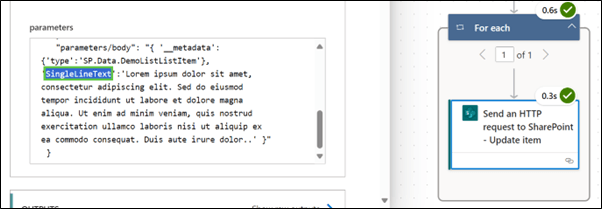
In this blog post, we learned how to use the Send HTTP Request to SharePoint action in Power Automate to update an existing single line of text column in a SharePoint list item. This action is powerful and flexible, allowing for various operations on SharePoint data using the REST API.
Did you know that the standard SharePoint actions in Power Automate, such as Get items and Update item, can only manage a maximum of 12 lookup columns? Also, did you know that column types like Image can't be utilized with the Create item and Update item actions? In such cases, the Send HTTP Request to … Continue reading Getting started with the Send HTTP requests to SharePoint using Power Automate→
Despite this blog post’s catchy title there is no magic upgrade button to move Microsoft Lists to Dataverse for Teams. There may be in the future but until then migration translates to rebuild. A list rebuild to Dataverse will most likely be caused by a design requirement that Lists is not suited to, like setting … Continue reading Migrate Microsoft Lists to Dataverse for Teams→
I've previously written about how to import data from Excel into Microsoft Lists. In this post, we will switch things up and export list data into Excel using Power Automate. In our scenario, we will export a subset of the list data into a date-named spreadsheet that is stored in Microsoft Teams daily. Excel Preparation … Continue reading Export Microsoft List data to Excel→
This article originally appears on the AvePoint blog as When a List Isn’t Enough: A Case for Dataverse and Model-Driven Apps. I like working with Microsoft Lists. They’re easy to create and easy to populate and have many options to improve the user experience with features like column formatting and extending functionality using services like the … Continue reading When a List Isn’t Enough: A Case for Dataverse and Model-Driven Apps→
In this blog post I will show how to copy multi-select Person values from one list to another. This post is a supplement to: Use Power Automate to move Microsoft Lists items to another list. I am using two lists called Source and Destination. Both lists have a Person column called "Person" that allows multiple selections. Create a new Flow … Continue reading Use Power Automate to copy multi-select Person values between Microsoft Lists→
This blog post is in response to a question posed in the comments section of Microsoft Lists: Updated Issue Tracker. The question is: "Wondering if there is a way of integrating the Teams chat function into the Issue Tracker – so that when someone opens an “issue”; I can chat with them within the context … Continue reading How to create a Teams chat from Microsoft Lists→
This article originally appears on the AvePoint blog as 5 Little-Known Microsoft Lists Features to Boost Efficiency. The Microsoft Lists platform supplies a fantastic way for users to collaborate on data using a single, low-barrier platform where solutions can start modestly and grow as requirements, experience, and features increase. The Microsoft investment in List modernization continues with … Continue reading 5 Little-Known Microsoft Lists Features to Boost Efficiency→
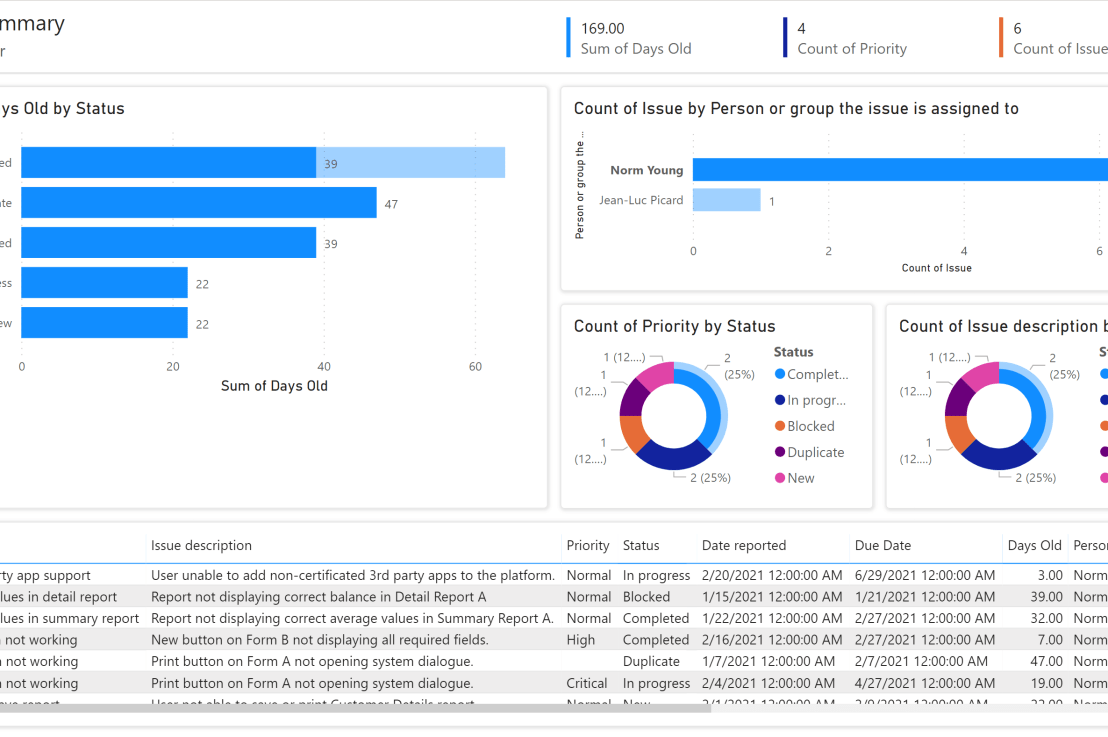
Microsoft is rolling out a new Power Platform integration for Microsoft Lists called Visualize the list. This latest addition creates an auto-generated Power BI report based on the underlying list schema. The auto-generated report provides an excellent starting point for users not proficient with Power BI. In this blog post I will show how to … Continue reading A first look at “Visualize the list” in Microsoft Lists→







 Norm Young