I'm sharing my "A 50 minute digital transformation" slide deck from the Microsoft 365 Virtual Marathon. Amazing content from some amazing speakers. Thanks to those that attended, I really appreciate it! Thanks to the organizers, you did an amazing job! NY a-50-minute-digital-transformation-m365virtual-marathon-norm-youngDownload
Build a safety issue solution using SharePoint and Power Automate- Part 4
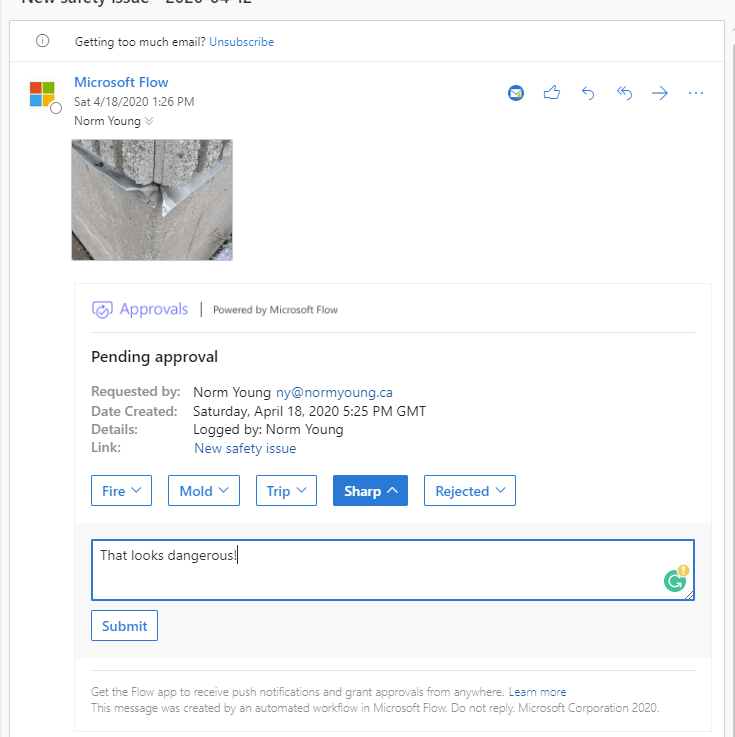
In the first three parts of this blog series (Part 1, Part 2, Part 3), we used Power Automate buttons as a way to report safety issues and store them in a SharePoint list. We created an approval and categorization process for the "admin" of the safety issue solution. Will we finish things off by … Continue reading Build a safety issue solution using SharePoint and Power Automate- Part 4
Build a safety issue solution using SharePoint and Power Automate- Part 3
Building on the first two entries of this blog series (Part 1, Part 2), we will continue adding functionality to our Power Automate and SharePoint solution. In this post, we will create and customize an approval process for the "admin" of the safety issue solution. Let's jump into Power Automate and create a new Flow … Continue reading Build a safety issue solution using SharePoint and Power Automate- Part 3
Build a safety issue solution using SharePoint and Power Automate- Part 2
In the first part of this blog series, we used a Power Automate button to report safety issues and a SharePoint list to store the entry. In this post we continue to build upon our solution by adding: A new list to categorize and assign safety issue types.Attributes to reflect the business process.List column formatting … Continue reading Build a safety issue solution using SharePoint and Power Automate- Part 2
Build a safety issue solution using SharePoint and Power Automate- Part 1
This blog post is inspired by this sharp, jagged piece of metal. I see this leg cutting, pant ripping piece of metal every morning when I walk into work and think to myself that I should report it. But by time I get to my office it's out of sight and out of mind and … Continue reading Build a safety issue solution using SharePoint and Power Automate- Part 1
SharePoint and Power Automate Help
Drawing inspiration from Éric Sauvé, I am offering up some of my free time to help others under stress with SharePoint, Power Automate and anything related as we continue to transition to working from home during the COVID-19 pandemic. If you need help, connect with me using Calendly and I will help as I can. … Continue reading SharePoint and Power Automate Help
Some personal updates
I’m sharing some personal updates since my last blog post. Despite coronavirus (COVID-19), 2020 has been very good to me. The New Year started with the Ignite Tour in Toronto. I attended as many Power Platform, SharePoint and Teams sessions as I could and came away from the event excited to do more with Power … Continue reading Some personal updates
Tech Community: Lock file for approval
This post is inspired by following Microsoft Tech Community conversation: https://techcommunity.microsoft.com/t5/PowerApps-Flow/Locking-a-file-for-approval/m-p/876434 The user wants to “create a document approval flow whereby the document is locked during the approval process so it can't be altered”. Using a custom Power Automate flow and SharePoint site columns we can lock the file and start a review and approval … Continue reading Tech Community: Lock file for approval
Tech Community: Flow to notify based on column input
This blog post is inspired by the following Microsoft Tech Community conversation: https://techcommunity.microsoft.com/t5/PowerApps-Flow/Flow-to-notify-based-on-column-input/m-p/812666 The user wants to send an email to users “assigned” to a document after it has been uploaded. In this demo I am using a standard document library with an additional site column called “AssignedTo”. Within your Document Library, click “Flow” and … Continue reading Tech Community: Flow to notify based on column input
Tech Community: Naming attachments
This post is inspired by following Microsoft Tech Community conversation: https://techcommunity.microsoft.com/t5/PowerApps-Flow/Naming-of-attachments-in-Flow/m-p/874218 Using Power Automate, Outlook attachments are being saved to SharePoint. Attachments need to be renamed based on extracted text from the email subject line. For example: “text1 text2 11849850 – text3” The part of the Flow that I am interested in will extract text … Continue reading Tech Community: Naming attachments